Best on a tablet or a computer
Everything below tells you what DocketPDF™ does. The program itself wants room: a page grid you drag across, an index panel beside it, a page editor with an alignment grid. Those need a tablet, laptop or desktop screen.
Read the whole pitch here, then open docketpdf.com on a larger screen when you are ready to work. The Android build is laid out for large tablets, and the Linux AppImage runs on any desktop.
Court forms library
The form you need, without the search engine detour.
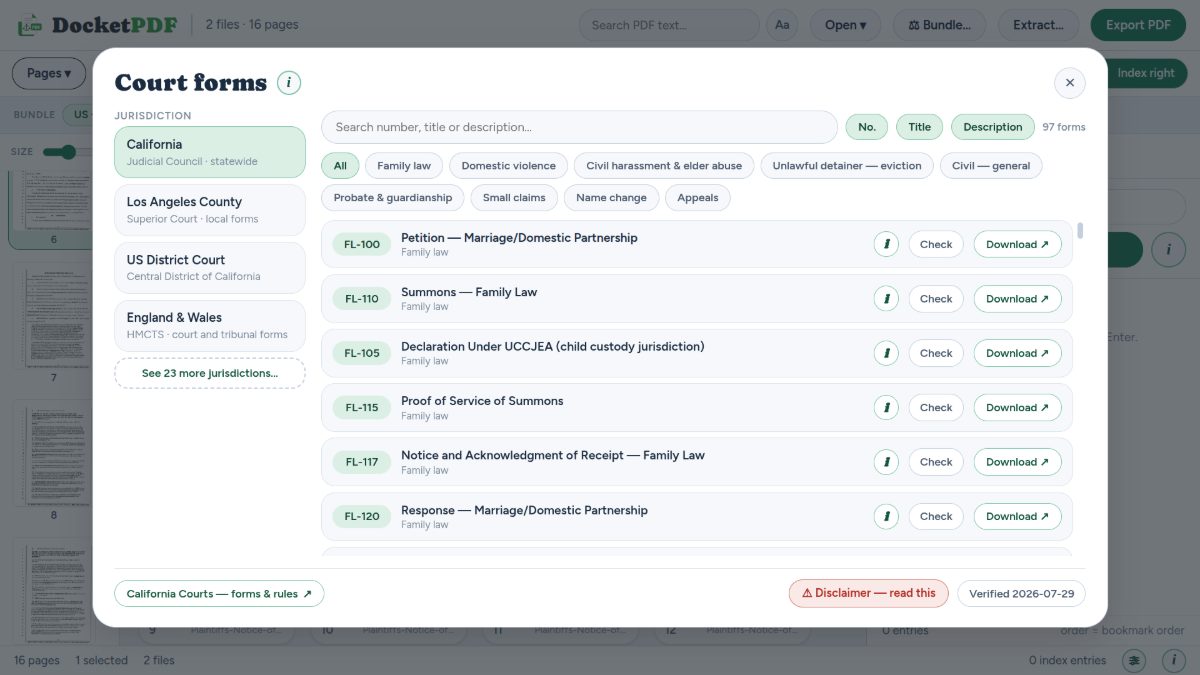
Search by number, title or description across 27 jurisdictions, filter by area of law, and pull the form straight into your set. California’s Judicial Council collection alone runs to 97 forms.
Areas covered
Collections
How we keep it honest
Check goes to the source
Every entry has a Check action that opens the issuing court’s own page for that form, so you can confirm you are holding the current revision. We do not ask you to trust our copy.
A verification date, printed
The library shows the date the collection was last verified against the court’s site. If that date looks old to you, it probably is — go to the source.
And a disclaimer you should read
Courts revise forms without notice, mandatory forms differ from optional ones, and the right form for your situation is a legal question. The library helps you find a document. It does not tell you whether to file it.
Templates, for the pages no court supplies
Pleading paper with the line numbers already ruled, proof-of-service pages, exhibit dividers, blank cover sheets. Insert one from a template and it drops in at the right place with the right margins.